Many people love the ease of touch lamps. You just tap them to turn them on or off. Smart plugs offer a different kind of ease. They let you control devices with your phone or voice.
This brings up an important question: Do touch lamps work with smart plugs? It’s a common query for those building a smart home. The answer isn’t always a simple yes or no. It depends on a few things.
We will explore how these two devices interact. We will also look at potential problems and how to get the most from your smart lighting setup.
Understanding How Touch Lamps Operate

Touch lamps are special. They use sensors to react to your touch. This sensor is often built into the metal base of the lamp.
The Magic Behind the Touch
When you touch the lamp, your body completes a tiny electrical circuit. This tells the lamp to change its state. It can turn on, turn off, or even dim.
Most touch lamps have different brightness levels. You might tap once for low light, twice for medium, and three times for bright. A fourth tap usually turns it off.
“Touch lamps rely on capacitive touch technology, sensing minute changes in electrical fields when touched.”
Types of Touch Lamp Controls
Not all touch lamps are the same. Some have simple on/off functions. Others offer multiple brightness settings. This difference is key when we talk about smart plugs.
Single-Function Touch Lamps: These just turn on or off. They are the simplest type.
Multi-Function Touch Lamps: These offer several brightness levels. They often cycle through dim, medium, bright, and off. This internal logic can clash with smart plugs.
What Exactly Are Smart Plugs?

Smart plugs are simple devices. You plug them into a standard wall outlet. Then, you plug your regular lamp or appliance into the smart plug.
How Smart Plugs Work Their Magic
Once connected, the smart plug connects to your home’s Wi-Fi network. This lets you control the power to the connected device. You can use a smartphone app or voice commands.
Imagine saying, “Hey Google, turn on the living room lamp.” The smart plug then turns on the power. This makes any ordinary device a ‘smart’ device. They are very popular for creating a smart home.
Benefits of Using Smart Plugs
Smart plugs offer many advantages. They add convenience and energy saving features.
| Feature | Description |
|---|---|
| Remote Control | Turn devices on/off from anywhere. |
| Voice Control | Use smart assistants like Alexa or Google Home. |
| Scheduling | Set timers for devices to turn on/off. |
| Energy Saving | Monitor energy use and prevent ‘vampire’ drain. |
Smart plugs essentially act as a remote switch. They cut or restore the power supply. They don’t change how the connected device works internally.
Do Touch Lamps Work With Smart Plugs? The Direct Answer

Here’s the key: Do touch lamps work with smart plugs? Yes, but with a big ‘but’.
Smart plugs simply turn the power on or off. They don’t interact with the lamp’s internal touch sensor. When a smart plug turns on, it restores power to the lamp.
The ‘Default On’ Challenge
Many touch lamps default to an ‘off’ state when power is first applied. This means even if the smart plug turns on, the lamp might stay off. You would still need to touch the lamp to activate it.
Consider this flow:
`Smart Plug ON` -> `Power to Lamp Restored` -> `Lamp Stays OFF (default)` -> `User Touches Lamp` -> `Lamp Turns ON`
This defeats the purpose of smart control. You want to control the lamp completely using the smart plug. Some older or simpler touch lamps might default to ‘on’ when power is restored. These are the ones that work best.
“For a touch lamp to truly ‘work’ with a smart plug, it must power on automatically when electricity is supplied.”
Why Some Touch Lamps Might Not Work with Smart Plugs

The main issue is the internal memory of the touch lamp. Most modern touch lamps are designed to be off when power is lost and then restored.
The ‘Last State’ Memory
Many smart devices have a ‘last state’ memory. They remember if they were on or off before power was cut. Touch lamps often do not have this feature in the way a smart plug needs it.
If your touch lamp has multiple brightness settings, this adds another layer of complexity. A smart plug can only turn power on or off. It cannot cycle through the dimming levels.
Dimming and Smart Plugs
Smart plugs are on/off switches. They do not dim lights. If your touch lamp has a dimming feature, a smart plug won’t control it. The lamp will just come on at its default brightness, if it comes on at all.
Problem 1: Lamp defaults to OFF when power is restored.
Problem 2: Smart plug cannot control dimming functions.
Problem 3: Lamp’s internal logic clashes with external power control.
This is why the question, do touch lamps work with smart plugs, often has a frustrating answer. It depends on the specific lamp’s design.
Types of Touch Lamps and Smart Plug Compatibility

Not all touch lamps are created equal. Their internal design dictates how well they will respond to a smart plug.
Older vs. Newer Touch Lamps
- Older Touch Lamps: Some very old touch lamps might simply turn on when power is applied. These are the best candidates for smart plugs. They lack complex internal logic.
- Newer Touch Lamps: Most modern touch lamps are designed to stay off after a power cut. This is a safety feature. It prevents them from turning on unexpectedly.
Lamps with Physical Switches
Some lamps look like touch lamps but also have a physical switch. If you leave the physical switch ‘on’ and use the smart plug, it might work. However, this is rare for true touch-only lamps.
Here’s a quick guide:
| Touch Lamp Type | Smart Plug Compatibility | Notes |
|---|---|---|
| Old, Basic On/Off | High | Often powers on when electricity is restored. |
| Modern, Multi-Level | Low | Usually defaults to OFF; dimming not controlled. |
| Touch with Memory | Low | Remembers last state, but often ‘off’ for power loss. |
So, before you ask, do touch lamps work with smart plugs, consider the age and features of your specific lamp.
How to Test Your Touch Lamp with a Smart Plug

The best way to know if your touch lamp will work is to test it. It’s a simple process.
Step-by-Step Testing Guide
- Plug in the Lamp: Plug your touch lamp directly into a wall outlet. Ensure it is working correctly by touching it.
- Turn it ON: Touch the lamp to turn it ON. Leave it in the ‘on’ state.
- Unplug the Lamp: While the lamp is on, unplug it from the wall. This simulates a power cut.
- Wait a Moment: Wait 5-10 seconds.
- Plug it Back In: Plug the lamp back into the wall outlet. Do not touch it.
Interpreting the Results
If the lamp turns on by itself: Great news!* This lamp will likely work well with a smart plug. When the smart plug turns on, your lamp should also turn on automatically.
If the lamp stays off: Less ideal.* This lamp defaults to ‘off’ after a power cut. It will not be truly smart plug compatible. You will still need to touch it every time.
This simple test answers the question: do touch lamps work with smart plugs for your specific lamp.
Best Practices for Using Touch Lamps with Smart Plugs

If your touch lamp does work with a smart plug, follow some best practices. This ensures a smooth smart home experience.
Keeping Things Simple
- One Setting: If your lamp turns on automatically, leave it at one brightness setting. The smart plug won’t control dimming.
- Avoid Constant Touching: Once connected to a smart plug, try to use the smart plug control only. Touching the lamp might interfere with its internal state and smart plug commands.
Safety First
Always ensure your smart plug is rated for the wattage of your lamp. Most lamps are low wattage, so this is rarely an issue. However, it’s good practice.
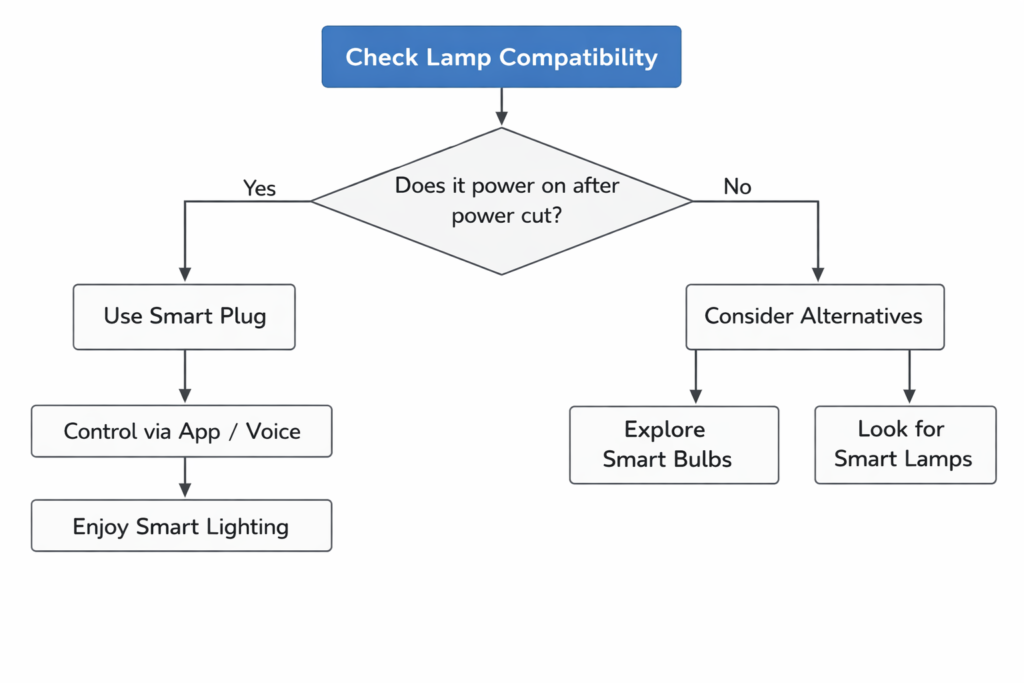
This flowchart helps decide how to proceed. It answers do touch lamps work with smart plugs from a practical standpoint.
Alternative Smart Lighting Solutions for Touch Lamps

What if your touch lamp doesn’t work with a smart plug? Don’t worry, you still have options for smart lighting.
Embrace Smart Bulbs
Smart bulbs are a fantastic alternative. These bulbs have Wi-Fi or Bluetooth built-in. You replace your regular bulb with a smart bulb.
* You can control them directly with an app or voice.
* They offer dimming, color changes, and scheduling.
* The physical lamp switch must stay ‘on’ for the smart bulb to receive power.
Consider Smart Lamps
Many companies now make lamps with smart technology built-in. These are designed from the ground up to be controlled by apps or voice assistants. They often offer more advanced features than a simple smart bulb.
“If your touch lamp resists smart plug integration, a smart bulb or a purpose-built smart lamp offers a seamless upgrade.”
The Future of Lighting
Smart home technology is always evolving. If do touch lamps work with smart plugs isn’t working for you today, new solutions might emerge. For now, smart bulbs and dedicated smart lamps are excellent choices.
Conclusion: Making Your Lighting Smarter, One Plug at a Time

Understanding if do touch lamps work with smart plugs can save you time and frustration. It’s clear that while the concept is appealing, not all touch lamps are compatible.
The key factor is how your specific touch lamp behaves when power is restored. If it turns on automatically, a smart plug is a good fit. If it defaults to ‘off’, you’ll need to explore other smart lighting solutions.
Smart plugs are amazing for many devices. For touch lamps, a quick test reveals the truth. No matter the outcome, a smart home with convenient, automated lighting is within your reach. Choose the best path for your unique lamps and enjoy a smarter home.
Frequently Asked Questions
Why don’t all touch lamps work with smart plugs?
Most modern touch lamps default to an ‘off’ state when power is restored. This means that even if a smart plug turns on, the lamp will stay off until you manually touch it. Only touch lamps that automatically turn on when power is supplied are truly compatible.
How can I check if my touch lamp will work with a smart plug?
To test, plug your touch lamp into a wall outlet and turn it on. While it’s on, unplug it, wait a few seconds, then plug it back in. If the lamp turns on by itself without you touching it, it will likely work with a smart plug.
Can a smart plug control the dimming functions of a touch lamp?
No, smart plugs are simple on/off switches. They cannot control the dimming features of a touch lamp. If your compatible touch lamp turns on, it will typically do so at its default or last set brightness level, not necessarily a dimmed one.
Can I schedule a compatible touch lamp to turn on/off with a smart plug?
Yes, if your touch lamp does turn on automatically when power is restored, then you can use a smart plug to schedule it. You can set times for the lamp to turn on or off using the smart plug’s app or voice commands.
What are the alternatives if my touch lamp doesn’t work with a smart plug?
If your touch lamp isn’t compatible, consider using smart bulbs. You replace your regular bulb with a smart bulb, which you can control directly via an app or voice, leaving the lamp’s physical switch (or internal touch sensor) always on. Dedicated smart lamps are another excellent option.

I’m Emily Johnson, an affiliate marketer and blogger focused on lamps and lighting. I share honest reviews, simple buying guides, and practical tips. My goal is to help readers choose the right lamp for their space, style, and budget with confidence.